Collector
Checking for the latest version…
Coming from Dungeon Helper 4? What changed in Collector
Collector records where things are as you play: chests and the loot tables they draw from, rare and named monsters, traps and their control boxes, levers, shrines, collectibles, keys, journals and explorer points. It sends them to Dungeon Helper’s map dataset, which merges sightings from everyone running Collector.
That dataset is what puts community pins on Mapster’s map, including the grey “maybe” pins for things that only spawn sometimes, and it feeds the maps on DDO Nexus. Every dungeon you run with Collector toggled on makes those maps more complete for everyone.
Getting started
Collector doesn’t come with the Dungeon Helper installer. Installing it is your choice to contribute.
- Download it above, then in the Dungeon Helper app open Plugins and use Install from zip.
- In game, press the backtick key (
`), open the Plugins tab and toggle Collector on. - Play as normal. Collector works in the background; there’s nothing to set up.
To stop contributing, toggle Collector off or remove it.
What it collects
- Placed objects: chests (with the loot table each one uses), traps and control boxes, levers, rest and resurrection shrines, collectibles, keys, crests, waypoints and journals. Each is recorded with the area, the quest and its position.
- Creatures that matter: bosses, raid bosses and named NPCs such as quest givers, trainers and vendors, with where they were seen. Ordinary monsters aren’t recorded.
- Explorer points, when you discover one.
- Run results, when you finish a quest: difficulty and reaper level, how long it took, experience earned and the bonuses behind it, and the kill, trap, secret door and breakable counts.
Sightings are merged, not stored per player: the same chest seen in fifty runs is one entry with a count. Lamannia is kept separate from the live servers.
What it sends
Only what’s listed above, plus:
- a random ID that Collector creates when it’s first installed, so repeat sightings from the same install aren’t double-counted. It isn’t linked to your account, characters or Dungeon Helper install;
- the version of Collector and of the game client.
It does not send your account, your characters’ names or IDs, your server, your inventory or your
chat. Everything goes to collect.dungeonhelper.com. See the privacy policy.
The Collector window
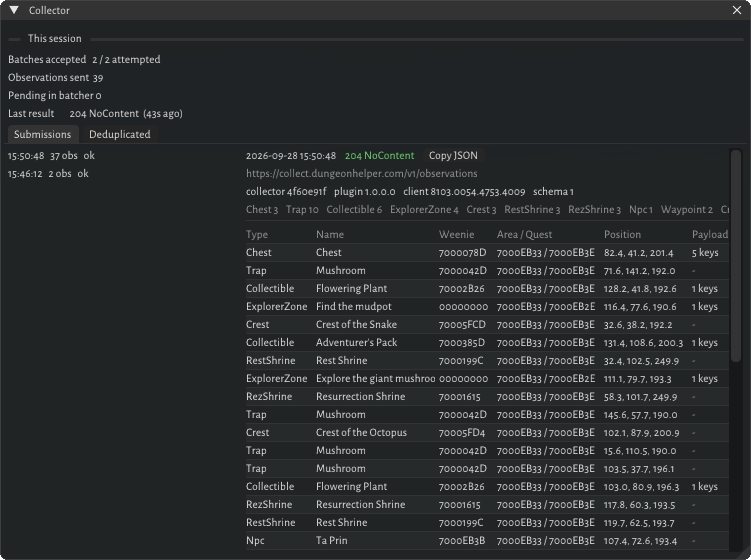
Collector’s window, from the Dungeon Helper toolbar, lets you see exactly what it sends.
- This session: how many batches and observations have been sent, anything still waiting, and the result of the last send.
- Submissions: every batch sent this session. Pick one to see each observation in it (type, name, area and quest, position) and the batch header, or copy the whole batch as JSON.
- Deduplicated: sightings Collector held back because it had already sent them.