
End Reward
Checking for the latest version…
Coming from Dungeon Helper 4? What changed in End Reward
When the end-of-quest reward panel opens, End Reward looks at every item on offer, works out what each one is (a heart seed, a commendation, a tome, an augment-slot item, a clicky, and so on) and takes the one you ranked highest. For items you want to pick yourself, it beeps and stands back. If nothing on your list is there, it can take the highest-level item for you to sell or turn into essences.
Getting started
- Toggle End Reward Plugin on in game (press the backtick key (
`), then Plugins) and log in. - Open it from the Dungeon Helper toolbar and check the three lists. The defaults are a good start.
- Run a quest. When the reward panel opens, End Reward picks for you, or beeps to hand you the choice.
It starts working straight away. Start on Load is on by default, so End Reward runs on every character from its first login. Untick it for characters you’d rather it left alone.
The three lists
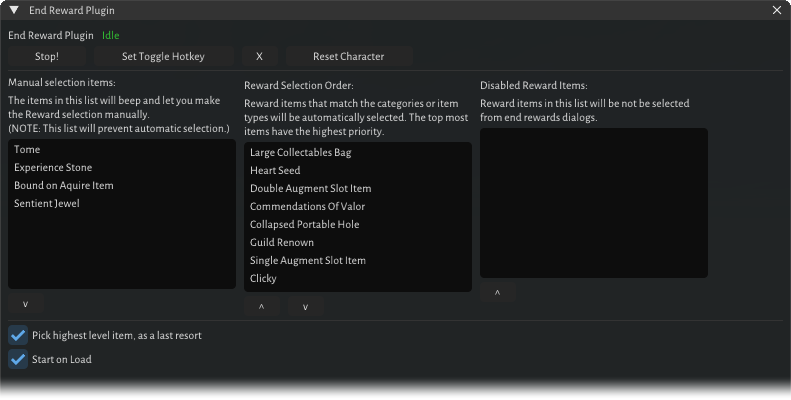
Each character has its own lists. Use the arrow buttons to reorder items and move them between lists.
- Manual selection items: if any of these appears, End Reward beeps once and leaves the choice to you. By default: Tome, Experience Stone, Bound on Acquire Item, Sentient Jewel.
- Reward Selection Order: the priority list; the highest-ranked item on offer wins. By default: Large Collectables Bag, Heart Seed, Double Augment Slot Item, Commendations Of Valor, Collapsed Portable Hole, Guild Renown, Single Augment Slot Item, Clicky.
- Disabled Reward Items: never chosen.
When two items tie, one made of a special material wins: silver, adamantine, mithral, wood, darkwood, byeshk, densewood or blueshine.
Settings
| Setting | What it does | Default |
|---|---|---|
| Pick highest level item, as a last resort | When nothing on your list is offered, takes the highest-level item | On |
| Start on Load | Starts End Reward when this character logs in | On |
| Toggle hotkey | A key combination that starts and stops End Reward from anywhere | None |
Reset Character puts this character’s lists and settings back to the defaults.
The status beside the title reads Running!, Idle or Inventory Full!.
When it holds back
- One beep: a manual-selection item is on offer, so it’s your pick.
- One beep: the panel has three items or fewer, which usually means lag or a ransacked chest, so it doesn’t choose.
- Three beeps: your inventory is full, so nothing is taken.
Good to know
- End Reward clicks the reward for you, and if the item binds when acquired it also confirms the bind prompt.
- Tomes are recognised from a built-in list, so a tome added to the game later may not be.
- Settings from End Reward Plugin for Dungeon Helper 4 carry over the first time you log in, and several clients can share the same settings.
- Released under the MIT licence. By Tune and RabidSquirrel.