
Fred
Checking for the latest version…
Coming from Dungeon Helper 4? What changed in Fred
Stop screenshotting enhancement trees. Fred reads your abilities, levels, feats, skills, enhancements, epic destinies, reaper trees, spells, past lives and tomes straight from the game. One click publishes a web page of your build that looks like the in-game enhancement panel. Paste a friend’s link or load a DDOBuilder plan, press Follow this build, and when you open the level-up window Fred shows you what to take next.
Named after the NPC who swaps your feats.
Getting started
- Toggle Fred on in game (press the backtick key (
`), then Plugins) and log in. Fred reads your build as you log in. - Open Fred from the Dungeon Helper toolbar and check the Current tab. If the game never recorded the order you took some class levels in, Fred asks you to fill it in, and remembers your answer.
Your build
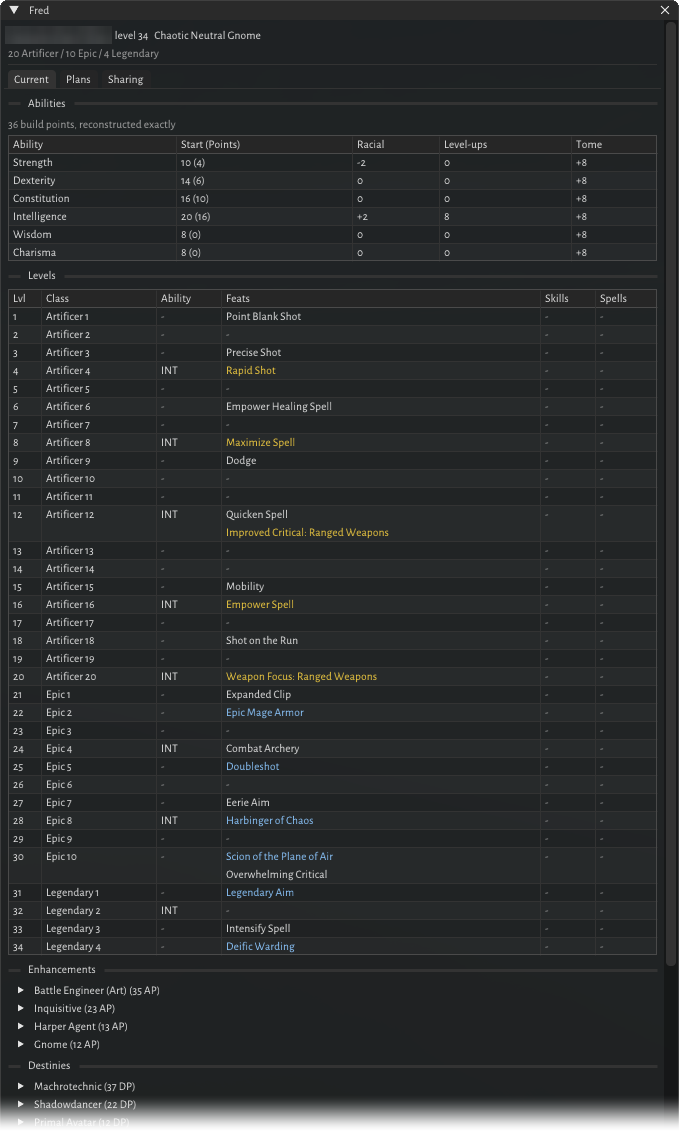
The Current tab shows:
- your class split, race and alignment;
- ability scores, including how your build points were spent at creation and where each level-up point went;
- a level-by-level table of classes, feats, skills and spells;
- every enhancement, epic destiny and reaper tree you’ve spent points in;
- known or memorised spells for each casting class;
- heroic, racial, iconic and epic past lives, and your tomes.
The game doesn’t remember how you spent skill points at each level, so Fred records every level-up it sees you make. Levels you took before installing Fred are reconstructed, and their skill choices are marked as missing.
Sharing
On the Sharing tab, give the build a title and press Share build. You get a link like
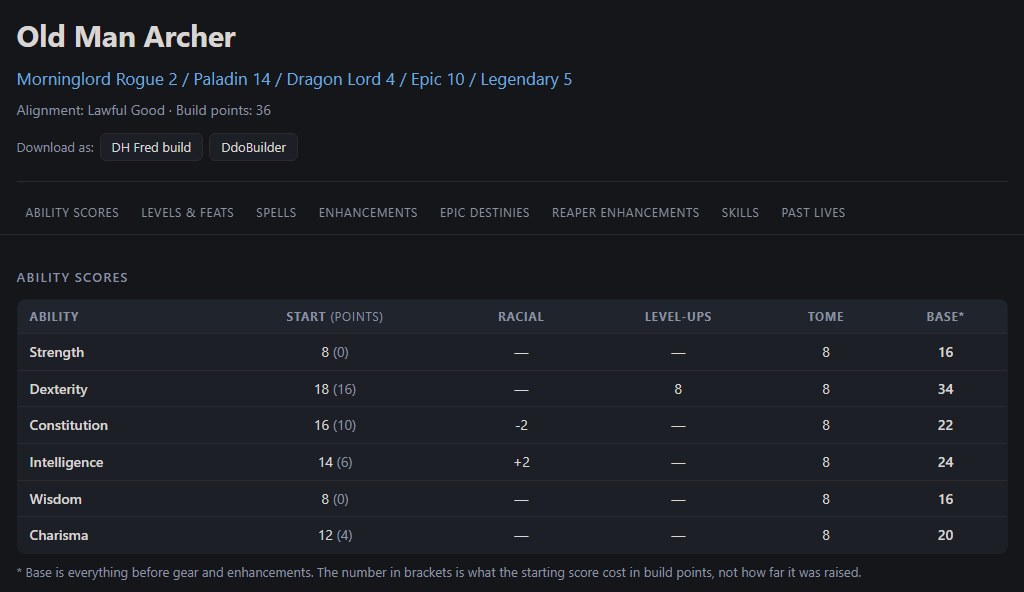
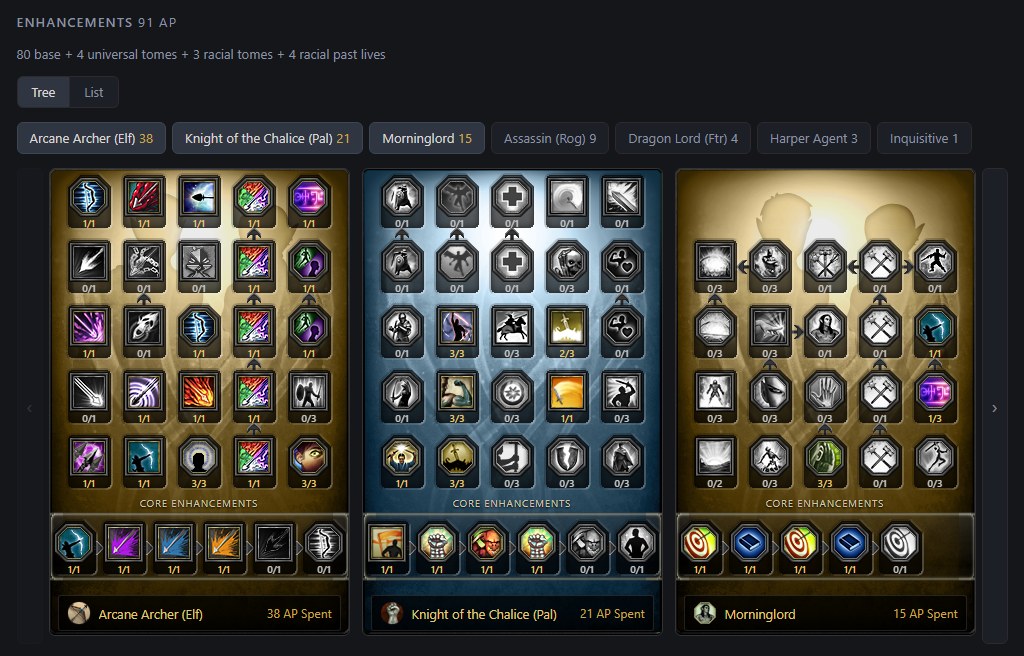
builds.dungeonhelper.com/b/… to copy or open. The page shows your abilities, a class and feat table,
spells, the enhancement panel exactly as it looks in game, destinies, reaper trees, skills and past lives,
with links to ddonexus.com. It also offers the build as a Fred or DDOBuilder download, and it previews
properly when pasted into Discord.
See one for yourself: Old Man Archer, a Morninglord Rogue 2 / Paladin 14 / Dragon Lord 4 archer shared with Fred.
A share is a snapshot: to publish changes, share again. Shared from this installation lists your past shares, each with a Delete button that removes the page for good.
What gets shared
Nothing leaves your computer until you press Share build. Fred removes your character’s name and ID before sending, but the title box starts out as your character’s name and level. The title is the only thing on the page that says whose build it is, so edit it if you’d rather stay anonymous.
Pages are unlisted, not private: there’s no search or listing, and search engines are asked not to index them, but anyone with the link can read the page. Pages don’t expire. Only the installation that shared a page can delete it, so if you reinstall, you lose the ability to delete older shares.
Plans: your build library
The Plans tab holds a library of builds. Add one by:
- pasting a Fred share link or its 12-character code;
- importing a DDOBuilder
.DDOBuildfile or a.fredbuildfile (a DDOBuilder file with several lives imports them all); - pressing Copy my build to save your current character.
Each build shows where it came from and how complete it is.
Export
For any build in the library, Export and share offers:
- Share link: the same web page as above.
- Write a .DDOBuild file for DDOBuilder. If some enhancements can’t be matched to DDOBuilder’s names, Fred lists them and offers to write the file without them.
- Copy BBCode for the DDO forums, with checkboxes for enhancements, destinies, reaper trees and past lives, and a character count so you stay under the post limit.
Following a build
Select a build and press Follow this build. A Next level card appears at the top of the Current tab showing the class, feats, skill points, spells and ability increase the plan takes at your next level. It warns you if your class split has drifted from the plan. Fred’s window opens by itself when you open the game’s level-up window.
Good to know
- Sharing and importing links need an internet connection. Imports only come from Fred’s own share site.
- Builds imported from DDOBuilder carry their full skill split. Enhancements are matched by name, so tree layouts may be simplified.