
Trove
Checking for the latest version…
Coming from Dungeon Helper 4? What changed in Trove
Trove records what your characters own as you play: inventory, equipped gear, personal bank, Reincarnation cache, shared bank and crafting storage, across all your characters and accounts on each server. Open the Trove Viewer to search all of it at once by name, effect, augment, set bonus, filigree or clicky spell. Narrow it down by slot, weapon or armor type, augment colour, named or raid, Mythic or Reaper, and more. Every result tells you exactly which character, bank tab and inventory position the item is in.
Everything stays on your computer. Trove sends nothing anywhere.
Getting started
- Log in, press the backtick key (
`) to open Dungeon Helper’s settings, and toggle Trove on under Plugins. Trove scans your inventory and gear right away. - Open your personal bank, Reincarnation cache, shared bank and crafting storage once each, and click through every tab and page. Trove learns what’s in a bank when the game shows it to you.
- Do the same on each character and account you want included.
- Click Open Viewer in Trove’s in-game window and start searching.
What Trove records
- Inventory and equipped gear, kept up to date as you pick up, move and destroy items. This includes what’s inside bags.
- Banks: personal bank, Reincarnation cache, shared bank and crafting storage, each time you open them. If you use the game’s own bank search, Trove doesn’t save that filtered view over your real bank.
- Platinum, when you log out.
- Full item details: effects, augment slots and what’s in them, filigrees, sentience, clicky spells, set bonuses, binding, damage and critical profile, minimum level and more. For items it hasn’t seen details for yet, Trove quietly asks the game to examine them, just as hovering over them would.
Deleted characters drop out on their own, and renamed characters keep their history.
In game
Trove’s in-game window is a small control panel:
- Disable tracking in quests stops watching inventory changes while you’re in a quest. Trove rescans when you’re back in town. It’s off by default.
- Pending examinations shows how many items are still waiting for their details.
- Refresh Inventory rescans this character now.
- Open Viewer opens the Trove Viewer.
The Trove Viewer
The viewer is a separate window on your desktop, so you can plan gear with DDO closed. While the game is running, it updates itself as Trove saves new data.
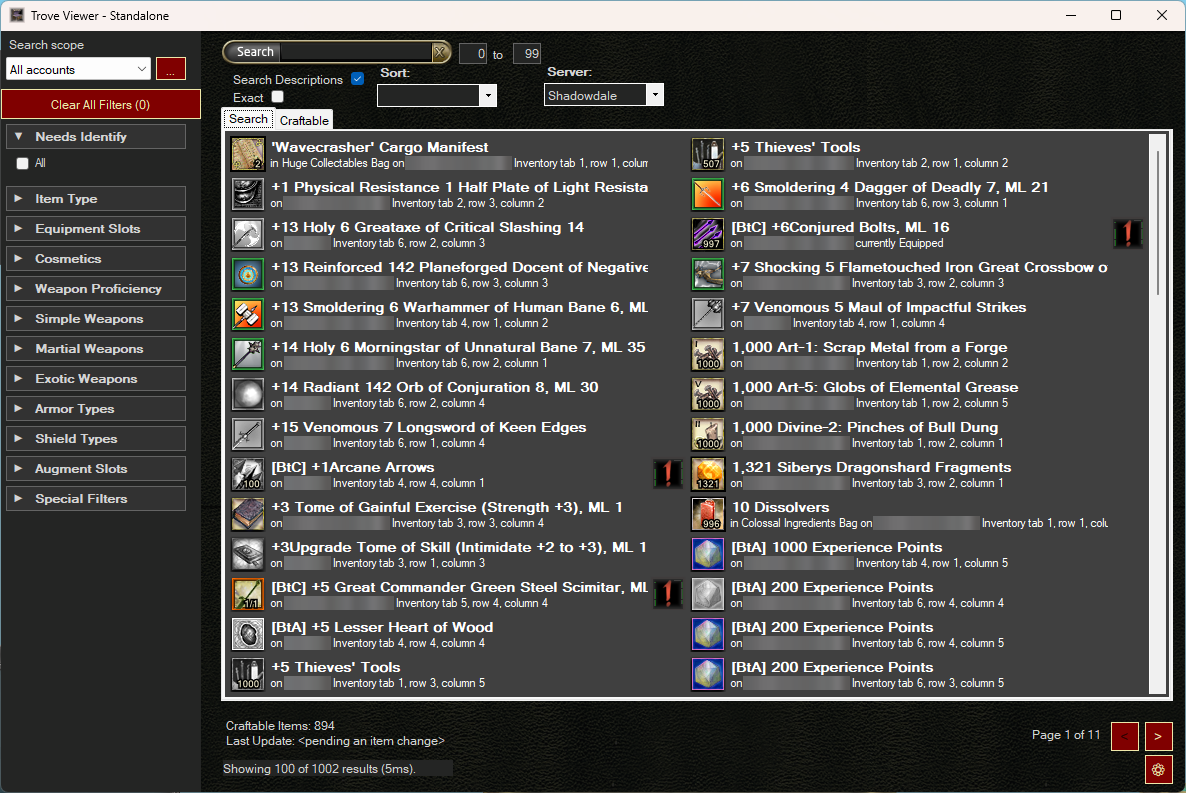
- Pick a server, then type in the search box. By default every word must appear somewhere on the item, in any order. Tick Exact to match the whole phrase, or Search Descriptions to include item, effect and augment descriptions.
- Level range and Sort (Alphabetical, Character or Account).
- Results show the icon with quantity or charges, binding, set names, and exactly where the item is: “on Bob, Inventory tab 2, row 3, column 4”, “on Bob, Bank tab Main”, “currently Equipped”, and so on. Hover a result to see the full item card.
Filters
Tick as many as you like; Clear All Filters resets them.
- Item Type: Ammunition, Augment, Armor, Bags, Clothing, Coin, Collectible, Ingredient, Jewelry, Potion, Runearm, Scroll, Shield, Weapon and more.
- Equipment Slots and Cosmetics.
- Weapons: by proficiency (Simple, Martial, Exotic) or by individual weapon type.
- Armor Types (Cloth, Docent, Light, Medium, Heavy) and Shield Types.
- Augment Slots: each colour including Sun and Moon, plus Multiple, Filled, Empty, No Augments and Exclude Colorless. Red, Yellow and Blue also match the combined slots that accept them.
- Special: Minor Artifact, Sentience, Named, Not Named, Raid, Reaper, Mythic, Equipped, Unequipped.
- Needs Identify: items Trove doesn’t have full details for yet.
Search scope
The … button next to Search scope lets you save presets: pick which accounts, characters and storage (inventory, bank, shared bank and so on) to search. The picker shows item counts and free slots for each, and you can give accounts friendly names.
Craftable tab
The Craftable tab gathers your non-named items into a tree for finding crafting and augment fodder: weapons by proficiency, type and augment colour; armor by type, family and material; clothing, jewelry and shields by slot and colour.
Good to know
- A bank is only as current as the last time you opened it, tab by tab.
- Searches cover one server at a time.
- Your data lives in Trove’s plugin folder under
%LocalAppData%\DungeonHelperData\plugins\Trove\. Back it up before removing or reinstalling the plugin. - Trove 4 uses a new update feed, so Trove 3 installs from Dungeon Helper 4 don’t upgrade to it by themselves.